FEATURES
DOT Compliance Software Features Built for Real-World Fleet Operations
Safety Navigator™ is designed to help fleets simplify compliance, reduce manual work, and stay better prepared for audits, incidents, and everyday operational demands. Instead of relying on spreadsheets, paper files, or disconnected systems, companies can use one centralized platform to manage records, monitor deadlines, and improve visibility across their compliance program.
Core Features That Support Day-to-Day Compliance
Centralized Compliance Records
Keep important compliance information in one place so your team can find what it needs faster and manage records with more confidence.
Deadline Monitoring
Track time-sensitive items like expirations, renewals, and certifications so fewer critical items get missed in a manual process.
User-Friendly Interface
Use a system built to be practical and intuitive without sacrificing the functionality needed to support more complex compliance demands.
Driver Complexity Management
Manage employee drivers, owner-operators, or a mix of both within a platform designed to reflect the realities of how fleets actually operate.
Advanced Qualification Capabilities
Support company-specific qualification rules and internal requirements instead of forcing your business into a generic structure.
Faster Access During Audits or Incidents
Retrieve essential information more quickly when your team needs to respond to an audit, investigation, or serious event.
Advanced Customizations
Tailor the software to your company’s workflows, documentation needs, driver categories, and compliance processes.
Software Plus Managed Services
Combine technology with expert support for companies that want stronger execution, oversight, and day-to-day compliance help.
See the Features in Action
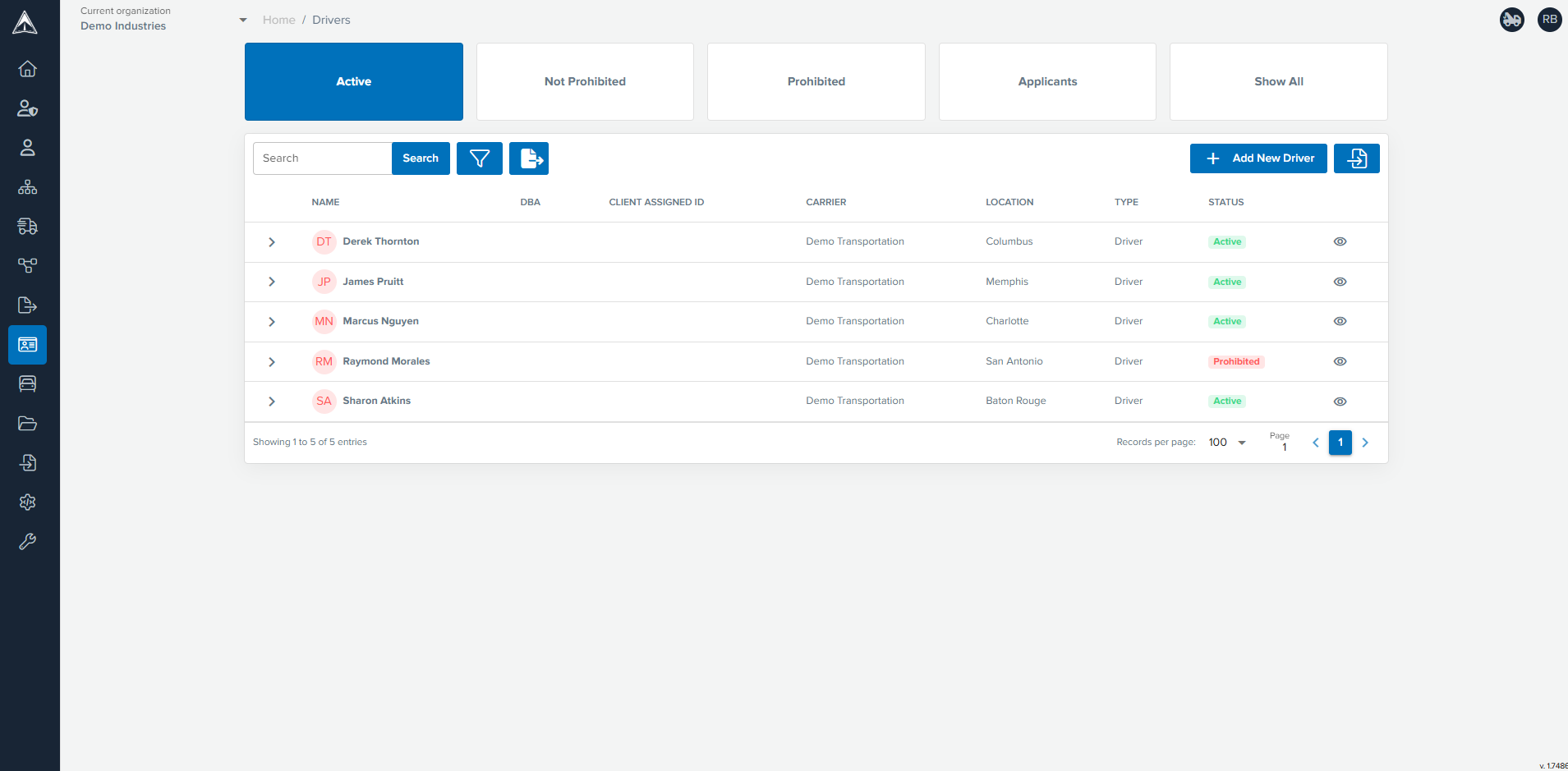
Driver List with Quick Filter Cards
View and filter your driver list using powerful filters or pre-configured quick filter cards. Select a driver to see his profile and qualification status or easily export the filtered list to Excel.
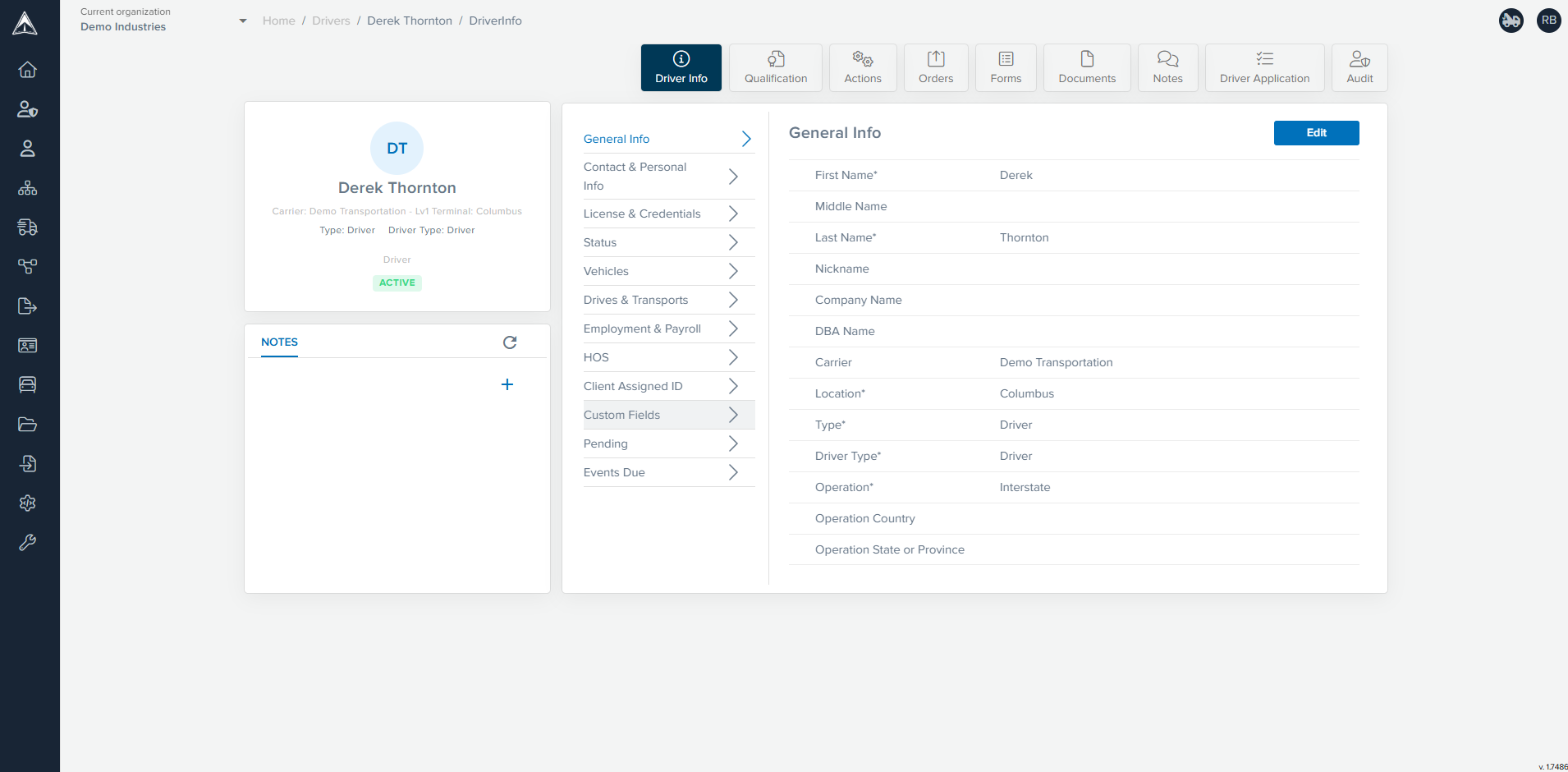
Driver Profile Info
Use Safety Navigator ™ to view and maintain your driver records in one place and easily navigate to what you need. If a user does not have access to sensitive personal data, the Contact & Personal Info tab will not appear.
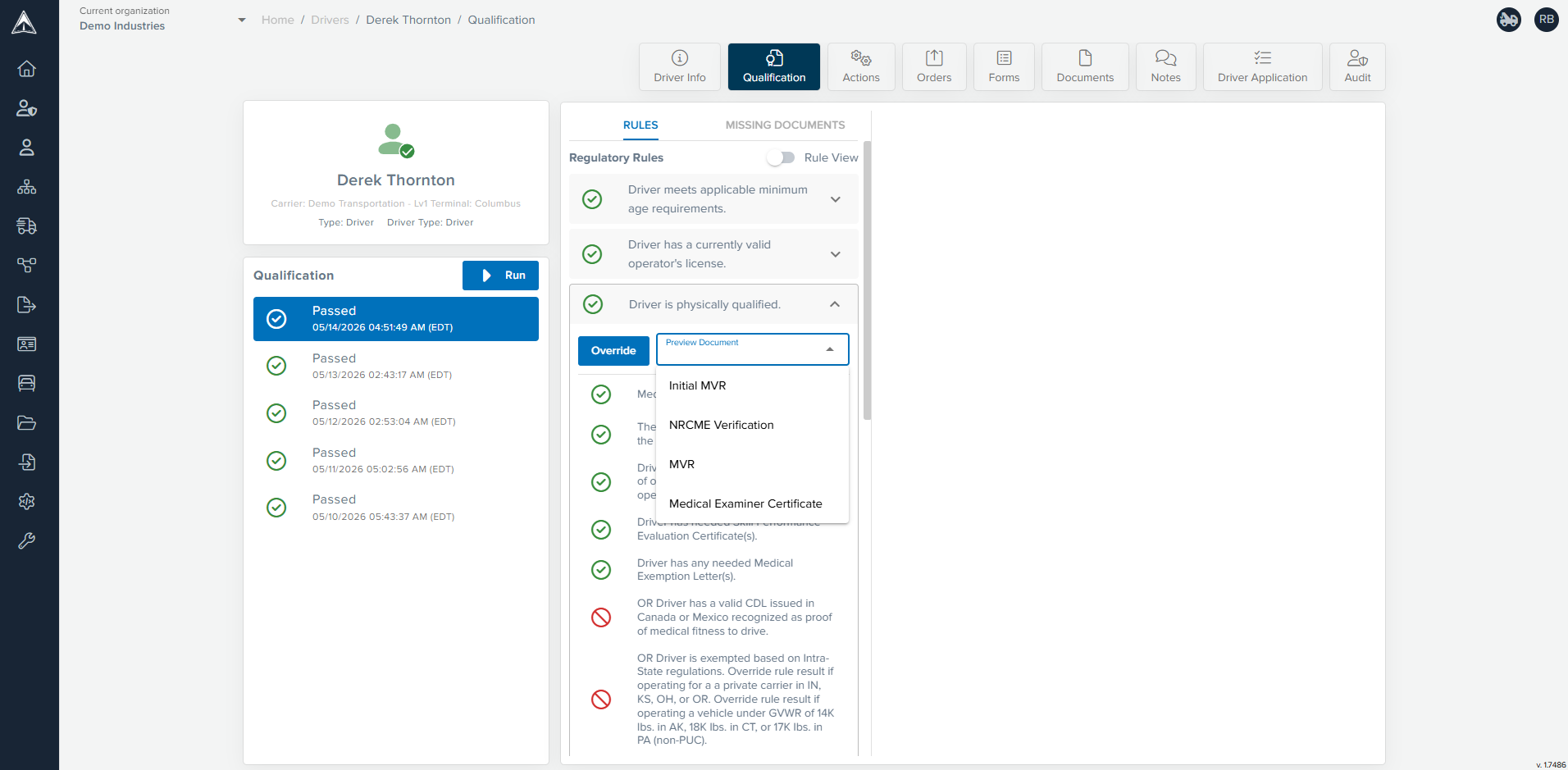
Qualification on Multiple Documents
Safety Navigator ™ does more than confirm the existence of a document. It uses AI to extract data and then evaluates the content of the documents in relation to one another to accurately determine the driver’s qualification status against regulatory rules as well as your own carrier-specific rules.
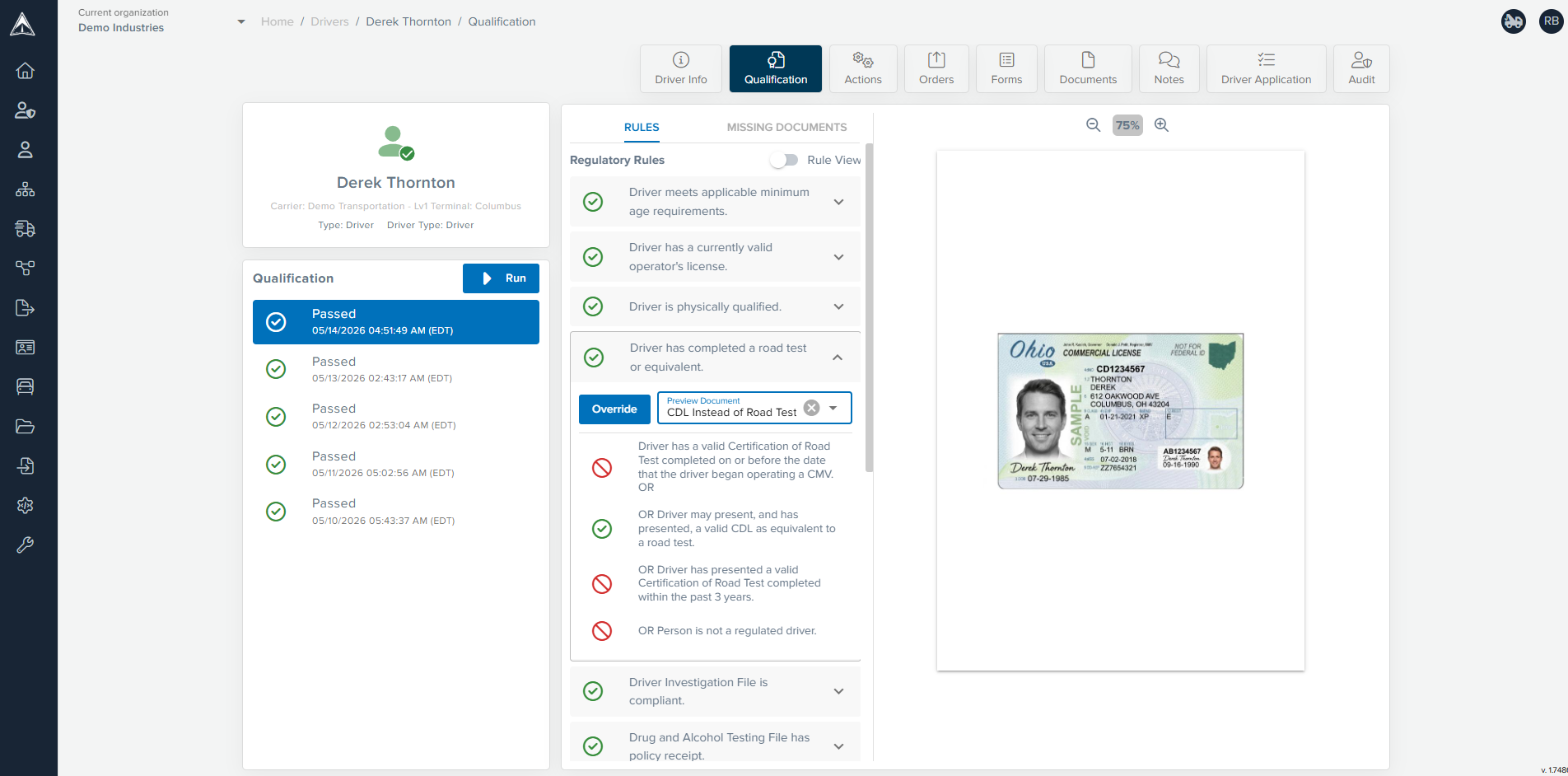
Qualification Rules
There are no mysteries with Safety Navigator ™. The qualification rules are presented in plain English so you can see exactly why your driver is, or is not, qualified. View the related document side by side with the qualification criteria.
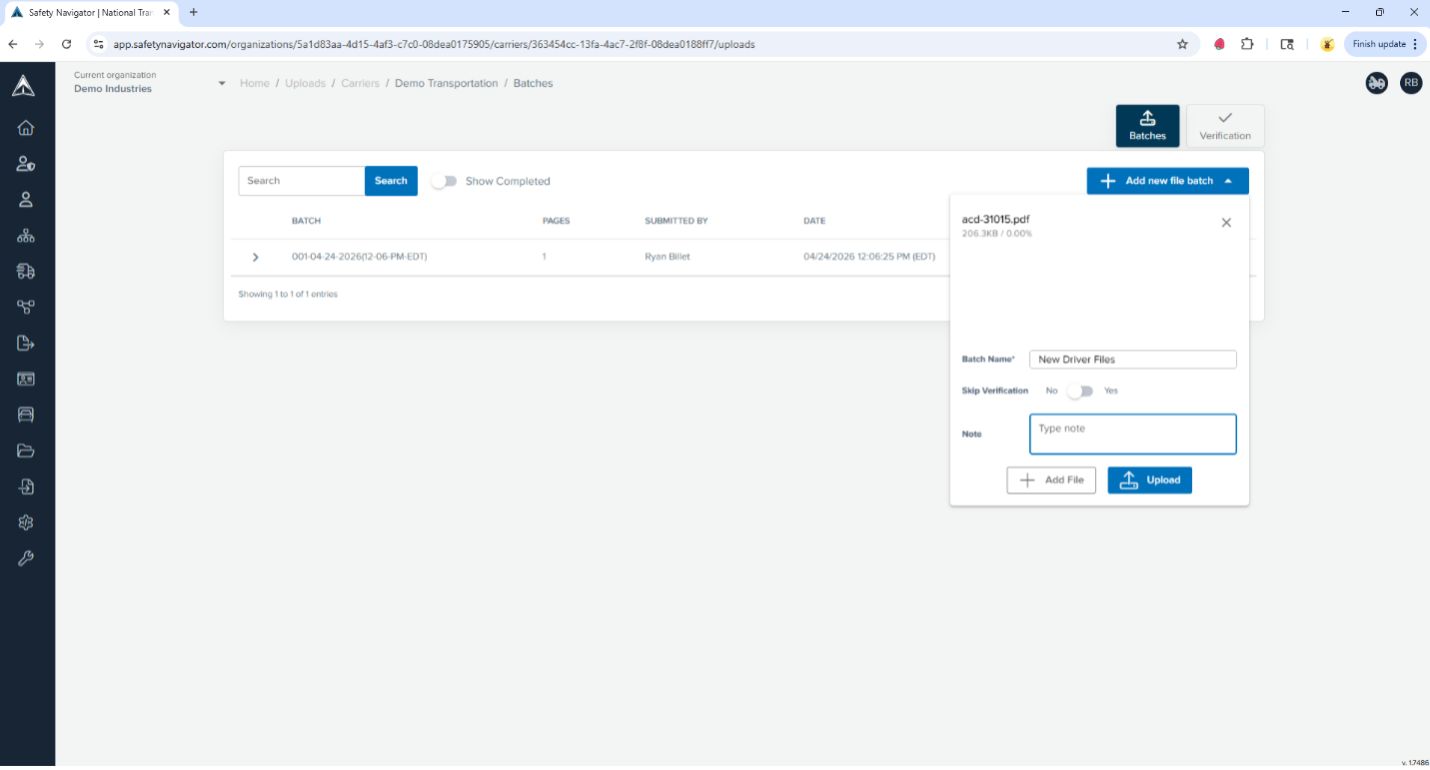
Upload Files
Drag and drop to upload files securely with end-to-end encryption. You don’t need to send files one at a time. Add what you have to the batch and upload it for processing.
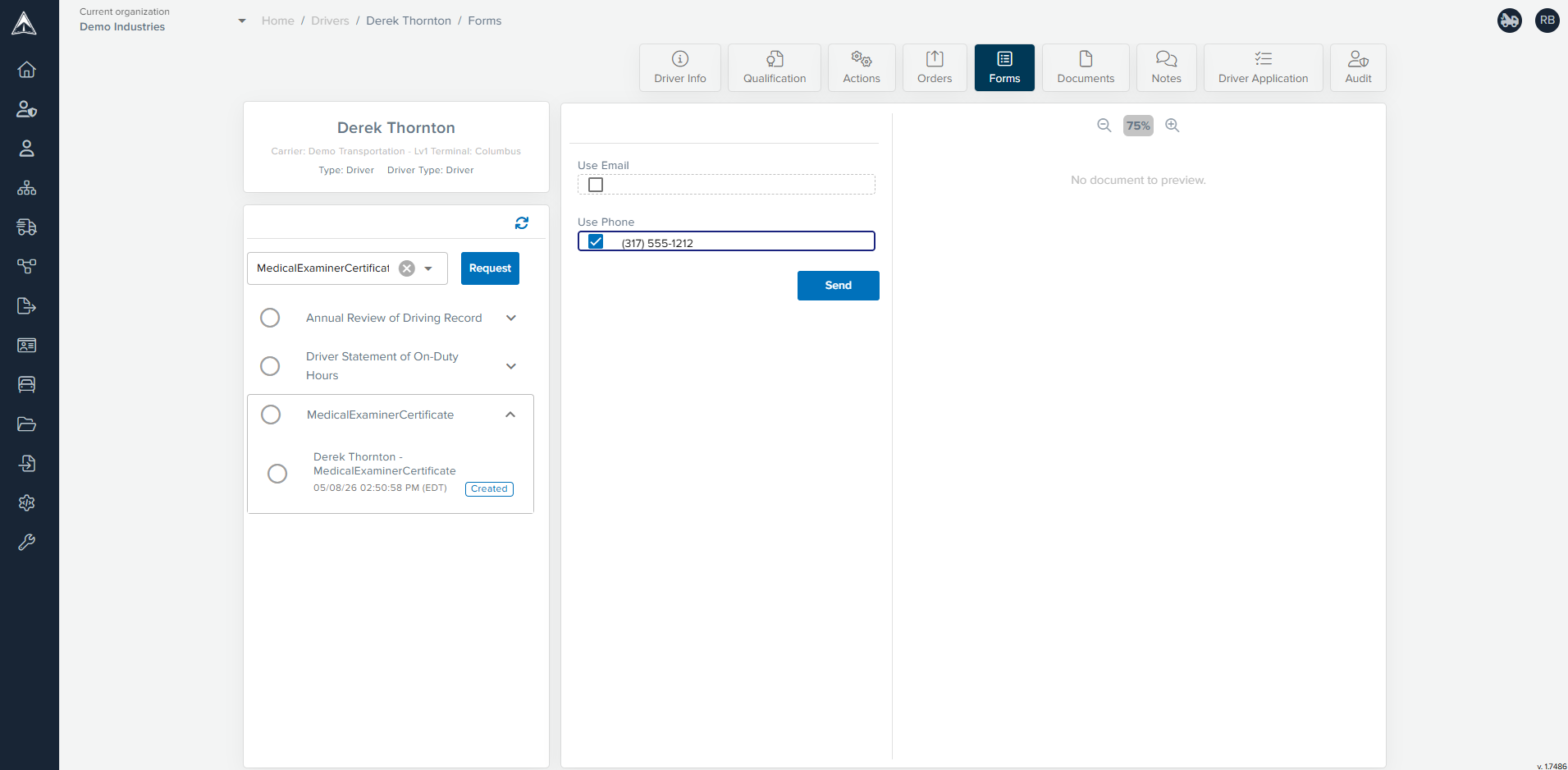
Send Request for Document Picture
Use Safety Navigator ™ to send pre-filled forms for your drivers to complete and sign electronically on their mobile device or ask them to provide you with a picture of a document. When complete, the document is returned directly to Safety Navigator ™ and the qualification is re-evaluated.
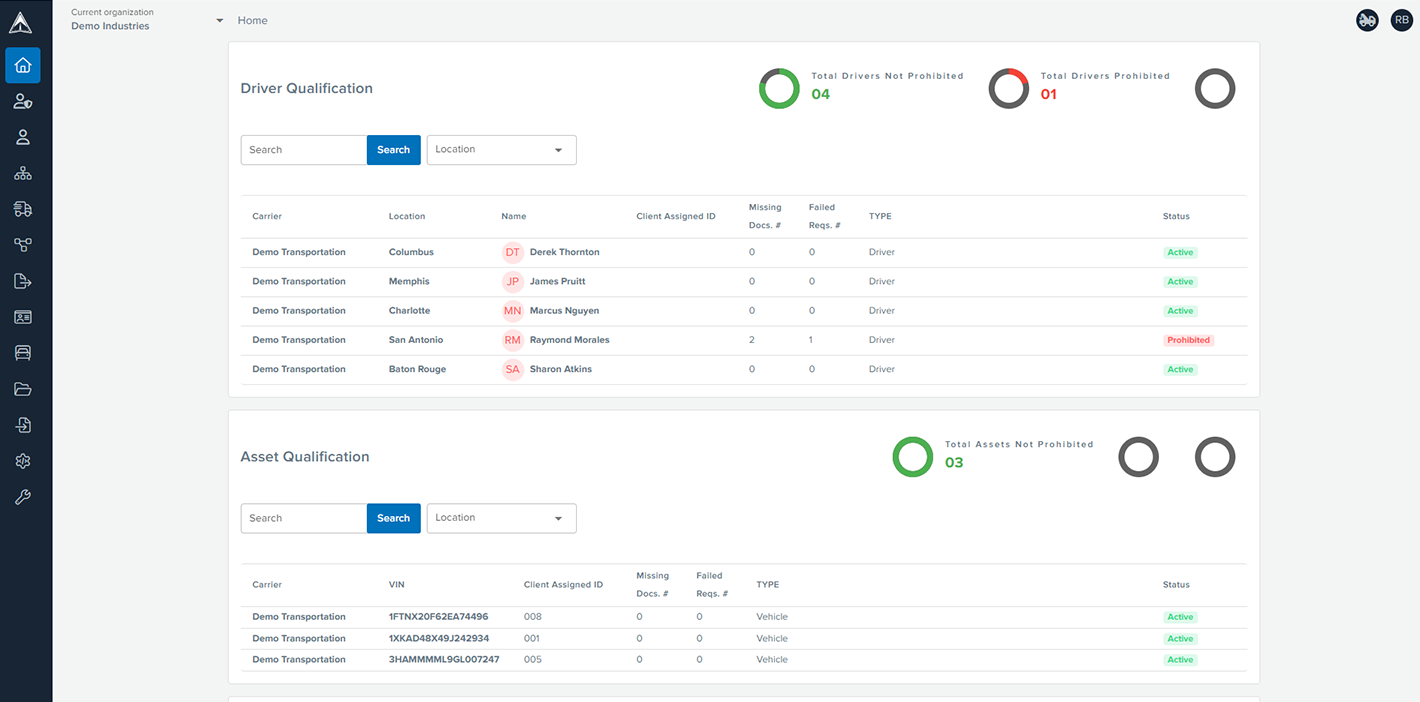
Dashboard
See the qualification status of your drivers and assets at a glance on the Safety Navigator ™ dashboard.

Asset List with Quick Filter Cards
View and filter your asset list using powerful filters or pre-configured quick filter cards. Select an asset to see its profile and qualification status or easily export the filtered list to Excel.
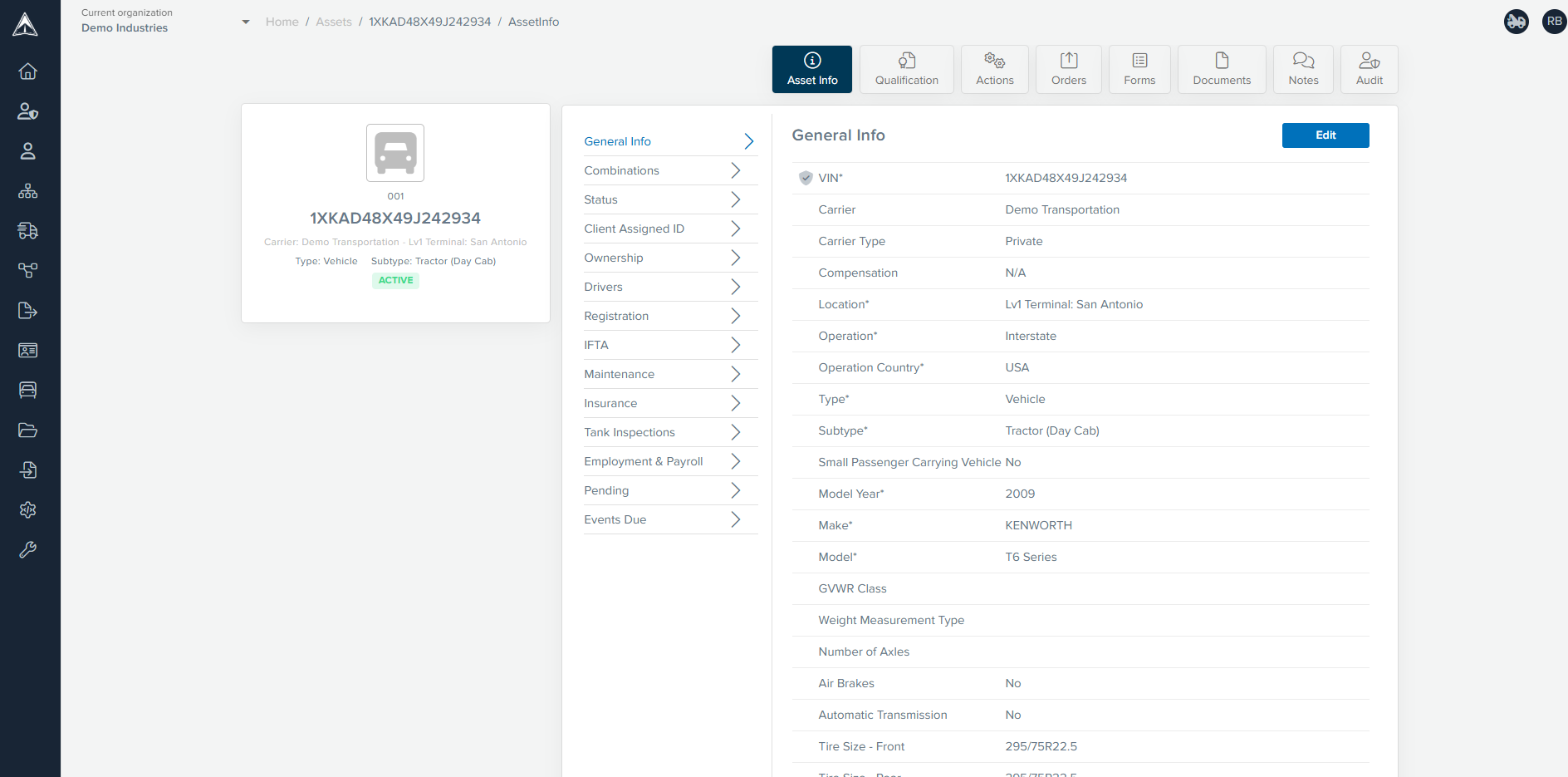
Asset Profile Info
View and maintain everything relevant to your assets in one place. Safety Navigator ™ even checks to ensure that your vehicles’ VINs are entered correctly.
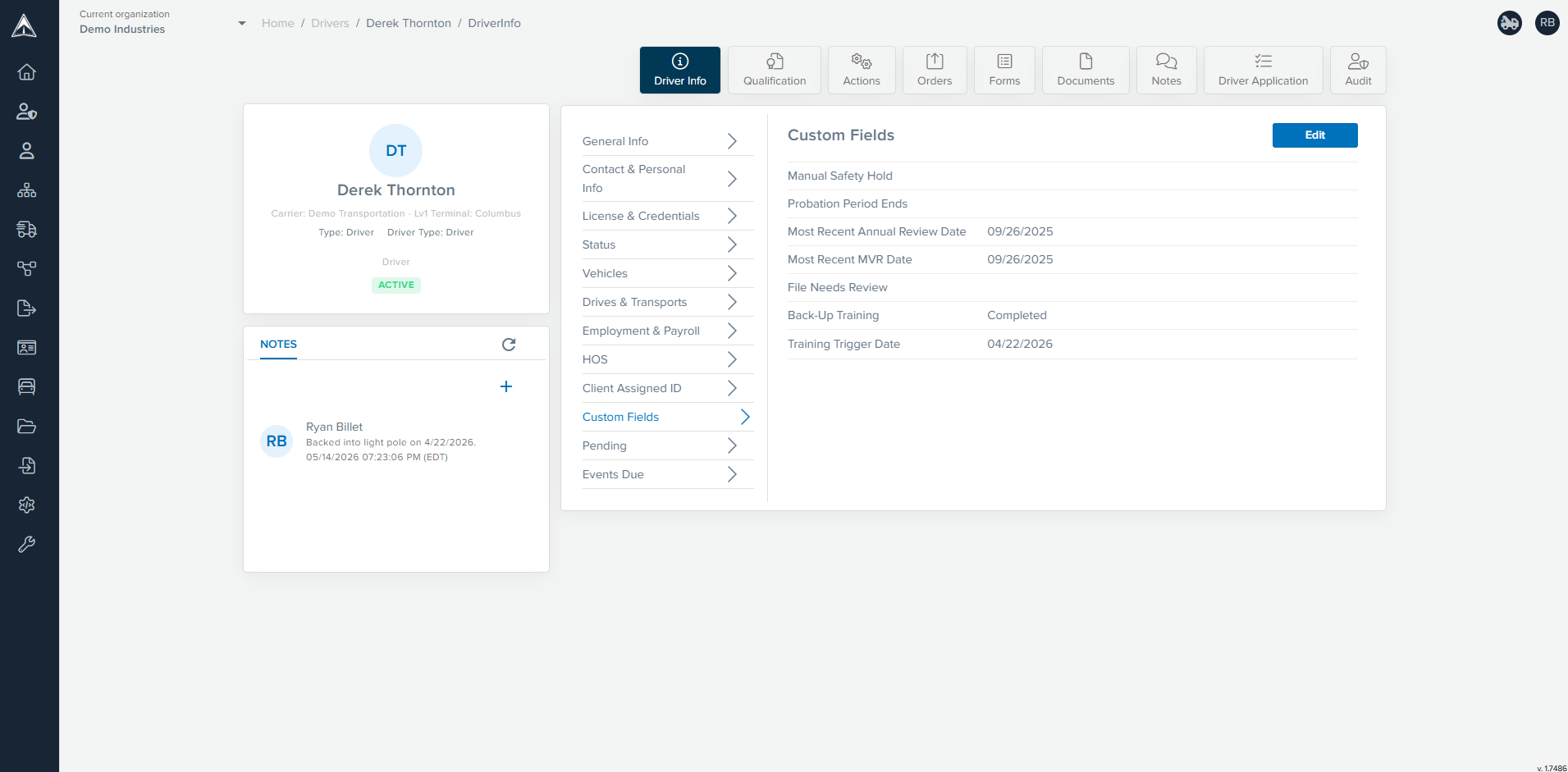
Custom Fields
With custom fields, you can use Safety Navigator ™ to track anything related to your drivers, assets and locations. We can even use those custom fields to write rules that ensure compliance with your internal policies.
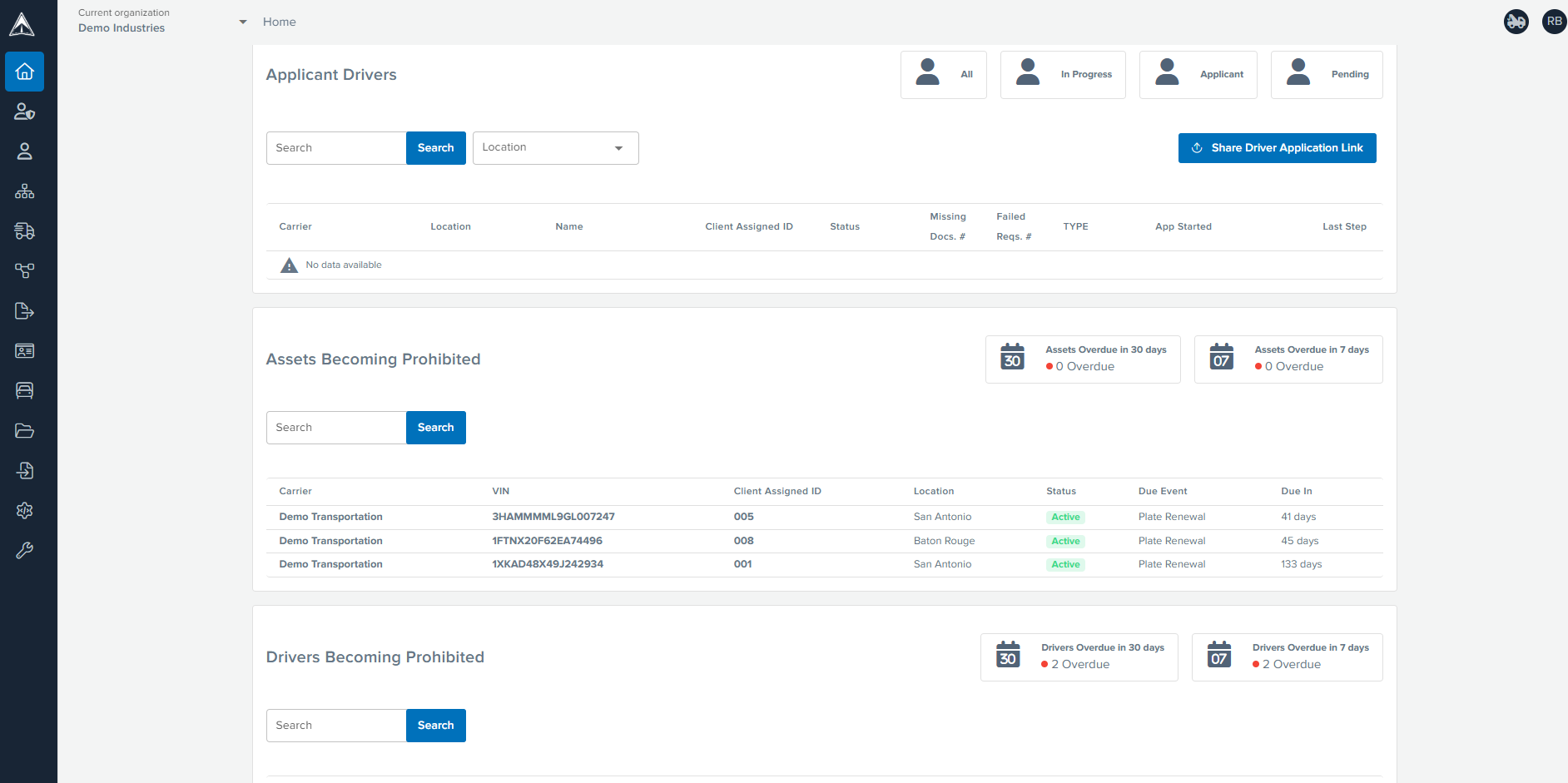
Dashboard
From your dashboard in Safety Navigator ™, you can quickly see the status of your applicants, invite drivers to apply and look forward to see drivers and assets that might become prohibited.
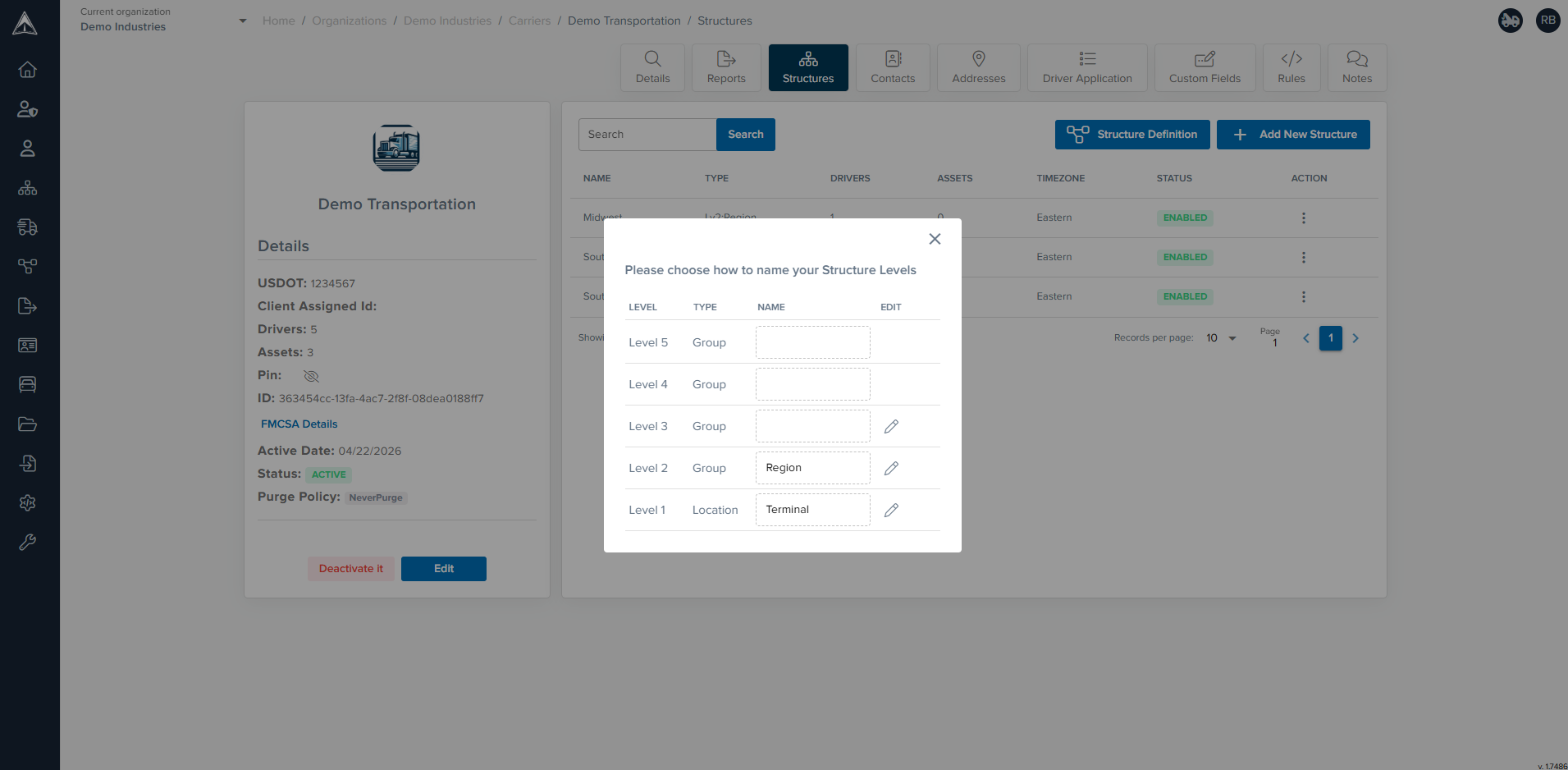
Define Organizational Structure
We can customize your organization’s structure in Safety Navigator ™ to assign rules and user access in ways that align with your business.
Built to Support Fleets of Any Size
Small Fleets Needing More Structure
Smaller operations often need a better way to stay organized without adding unnecessary complexity. Safety Navigator™ helps create more structure, improve visibility, and reduce the burden of manual compliance tracking.
Growing Fleets Managing More Moving Parts
As fleets grow, deadlines, documentation, and oversight responsibilities become harder to manage consistently. Safety Navigator™ gives growing operations a more structured system to support stronger internal control.
Larger Fleets with More Complex Needs
Larger fleets often need more flexibility, more visibility, and stronger workflows across more drivers, more deadlines, and more stakeholders. Safety Navigator™ is built to support more complex operations without forcing companies into a rigid setup.
Companies Managing Different Driver Types
Operations with employee drivers, owner-operators, or a mix of both often need a system that can reflect those differences clearly. Safety Navigator™ is designed to support that complexity in a more practical and organized way.

What These Features Help Your Team Do

Improve Visibility
Give your team a clearer view of what is current, what is missing, and what needs attention.
Reduce Manual Work
Move away from disconnected spreadsheets, paper files, and time-consuming tracking processes.
Stay Ahead of Deadlines
Create a more reliable system for monitoring renewals, expirations, and other time-sensitive compliance items.
Strengthen Audit Readiness
Make important records easier to retrieve when your team needs to respond quickly.
Support a More Consistent Process
Create stronger internal structure across your compliance program, even as the operation grows more complex.
Align Software with Real Operations
Use a platform that can reflect your company’s actual workflows instead of forcing you into a rigid setup.
Frequently Asked Questions
What are the most important DOT compliance software features?
The most important features usually include centralized record management, deadline tracking, document visibility, user-friendly workflows, audit readiness support, and the ability to align the system with your actual operation.
Can Safety Navigator™ be customized for different fleet structures?
Yes. Safety Navigator™ is built to support employee drivers, owner-operators, or a combination of both, along with company-specific rules and workflows.
Is Safety Navigator™ only useful for larger fleets?
No. Safety Navigator™ is designed to support both smaller fleets that need more structure and larger operations managing more complexity.
Do these features replace the need for internal compliance oversight?
No. Software is a strong tool, but it works best when paired with sound internal processes and, when needed, experienced outside support.
Can Safety Navigator™ work alongside managed services?
Yes. Companies that want technology plus expert support can pair the platform with managed services for stronger implementation and ongoing help.
See Which Features Fit Your Operation
If you want better visibility, stronger organization, and a more practical way to manage compliance, schedule a demo to see how Safety Navigator™ can support your team.